POPULAR COURSES
Master Programs



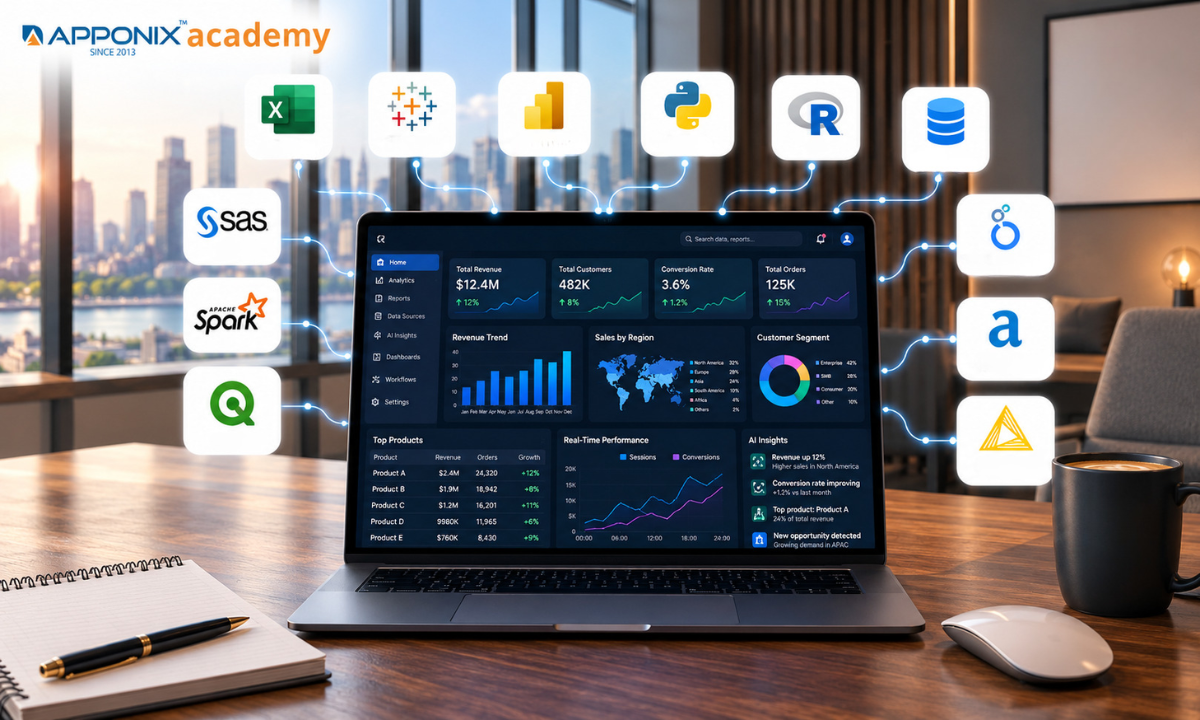
Table of contents:
|
1. What is a data analysis tool? |
|
2. The Most Important Tools to Analyse Data (top 10 to 12)
|
|
3. Which tool is useful for which sector? |
|
4. AI models and tools for data analytics |
|
5. FAQs |
Exploratory data analysis tools actually do, the 12 platforms worth learning in 2026, which one fits your industry, and how AI is now sitting inside every one of them.
What is a data analysis tool?

Any software used to collect, clean, organize and analyse data to make a decision, is considered a data analysis tool.
Well, that's a broad brush, as they say. A “tool” may be as basic as a spreadsheet that adds up a column, but also as sophisticated as a machine learning-based platform that forecasts demand for the next quarter. They have one thing in common: they all do the same thing — they transform disorganized and disjointed data into something that a person can use, whether it's a trend, a forecast, a dashboard, a report.
There are a number of overlapping categories of tools in this space, the majority of which are:
Quick manual analysis with spreadsheet; business intelligence (BI) dashboards and reporting; programming languages for custom statistical and machine-learning tasks; data structured and scalable to be pulled out of a database or a query; and cleaning and blending of data through a workflow/ETL platform.
The selection is typically based on three criteria: Is your team technically savvy or not, is your data large and cumbersome, and is the resulting chart a one-off or a dashboard that must be continually updated?
The Most Important Tools to Analyse Data (top 10 to 12)
It will depend on the size of your data, your coding experience, your budget, etc. There is no “best” tool. The following are the essential tools for data analysis and are among the most frequently used by analysts, with a brief pros and cons summary for each.
1. Microsoft Excel
Excel for data analysis is still the most widely used analysis tool on the planet. 90% of business analysis, without a line of code, is covered by pivot tables, Excel formulas, and Power Query.
|
Pros |
Cons |
|
Nearly universal — almost every employee already knows the basics |
Struggles with datasets beyond ~1 million rows |
|
Pivot tables make quick summaries effortless |
Manual, error-prone for repeated or complex workflows |
|
Low cost if already bundled in Microsoft 365 |
Limited statistical and machine-learning capability |
|
Power Query adds real ETL and automation features |
Version control and collaboration are clunky |
2. Tableau
A drag-and-drop visualization platform, designed to deliver large, interconnected datasets, as interactive dashboards that everyone can use.
|
Pros |
Cons |
|
Best-in-class, highly interactive visualizations |
Expensive per-seat licensing |
|
Connects to almost any data source |
Steeper learning curve for advanced features |
|
Strong community and template library |
Heavy on system resources with large datasets |
|
Real-time collaboration via Tableau Cloud |
Limited native statistical modelling |
3. Microsoft Power BI
Microsoft's BI platform combines a “spreadsheet-like” user experience with powerful dashboarding capabilities and seamless integration with the rest of Microsoft's ecosystem.
|
Pros |
Cons |
|
Much cheaper than Tableau at scale |
Can feel sluggish with very large models |
|
Tight integration with Excel, Teams, and Azure |
DAX formula language has a learning curve |
|
Built-in Copilot for natural-language queries |
Best features favour Windows/Microsoft shops |
|
Frequent monthly feature updates |
Sharing outside an org can require extra licensing |
4. Python (pandas, NumPy, scikit-learn)
Exploratory data analysis with python and pandas - Python is a language that is available by default for custom data analysis, automation and machine learning. You can now go from raw data to a predictive model in one script thanks to libraries such as pandas and scikit-learn.
|
Pros |
Cons |
|
Free, open-source, and massively documented |
Requires programming skill to get started |
|
Unmatched flexibility — from cleaning to deep learning |
No built-in GUI; setup can intimidate beginners |
|
Huge ecosystem of libraries for any use case |
Code quality and reproducibility depend on the author |
|
Scales from a laptop script to production pipelines |
Slower than compiled languages on very large loops |
5. R
Created for statisticians, by statisticians. R is still the best choice for serious statistical modelling, research and publication quality plots with ggplot2.
|
Pros |
Cons |
|
Best-in-class statistical and academic packages |
Smaller general-purpose ecosystem than Python |
|
ggplot2 produces exceptional custom visuals |
Slower for general-purpose software engineering |
|
Free, open-source, huge CRAN package library |
Syntax can feel inconsistent for newcomers |
|
RStudio/Posit gives a polished dev environment |
Memory-heavy with very large datasets |
6. SQL (MySQL, PostgreSQL, SQL Server)
The common language for accessing and manipulating information from relational databases. Just about every other tool in this list will at some point have to query a SQL database.
|
Pros |
Cons |
|
Fast, reliable access to structured, large-scale data |
No native visualization — needs a partner tool |
|
A near-universal skill across every tech role |
Limited for unstructured or messy data |
|
Well suited to repeatable, automated reporting |
Advanced statistics require external libraries |
|
Free, open-source engines widely available |
Syntax and features vary by database vendor |
7. SAS
A long-standing enterprise statistical platform, particularly entrenched in banking, insurance and pharmaceuticals where regulatory approval and auditability are important.
|
Pros |
Cons |
|
Extremely robust, validated for regulated industries |
Expensive licensing, often enterprise-only |
|
Long track record in clinical trials and finance |
Smaller talent pool than Python/R |
|
Strong customer support and formal training paths |
Less modern, flexible interface than newer tools |
|
Handles very large, governed datasets reliably |
Slower innovation cycle than open-source rivals |
8. Apache Spark
The core of most big data and streaming analytics pipelines is a distributed processing engine that can analyse data sets which are too large to fit in a single machine.
|
Pros |
Cons |
|
Processes massive datasets across clusters in parallel |
Overkill for small or medium-sized datasets |
|
Supports batch and real-time streaming analytics |
Requires cluster setup and infrastructure knowledge |
|
Works with Python, R, Scala, and SQL |
Steep learning curve for tuning and debugging |
|
Free and open-source, backed by a large community |
Resource-hungry; can be costly to run at scale |
9. Qlik Sense
A BI platform based on an associative data engine that enables users to discover relationships among the enterprise data rather than follow a pre-built path in the data.
|
Pros |
Cons |
|
Associative engine reveals hidden data relationships |
Smaller user community than Tableau or Power BI |
|
Strong in-memory performance on large datasets |
Interface feels less intuitive to new users |
|
Good governance and enterprise security controls |
Pricing can be opaque and enterprise-focused |
|
Solid mobile and embedded-analytics options |
Fewer third-party tutorials and templates online |
10. Google Looker Studio
A browser-based reporting solution that is seamlessly connected to Google Analytics, Google Ads, BigQuery and Google Sheets — a preferred choice for marketing and web-analytics teams.
|
Pros |
Cons |
|
Free to use with generous data-source connectors |
Performance lags with very large or complex datasets |
|
Seamless with Google Analytics, Ads, and BigQuery |
Fewer advanced statistical or modelling features |
|
Easy sharing via a simple link, like a Google Doc |
Customisation is more limited than paid BI tools |
|
Gentle learning curve for marketing teams |
Real-time refresh can be slower on free tier |
11. Alteryx
An unglamorous but critical task before data ever hits a dashboard is cleaning, blending and preparing it—a process that can now be automated using a drag-and-drop workflow tool.
|
Pros |
Cons |
|
No-code workflows for complex data preparation |
One of the pricier tools on this list |
|
Saves significant time versus manual data blending |
Large workflows can become hard to maintain |
|
Built-in predictive and spatial analytics tools |
Smaller talent pool compared with Python/SQL |
|
Strong for repeatable, scheduled data pipelines |
Desktop version needs a capable local machine |
12. KNIME
An open source visual analytics platform that enables teams to tap into the power of data blending and machine learning without coding by simply connecting nodes.
|
Pros |
Cons |
|
Free, open-source core with a large node library |
Interface feels dated next to newer competitors |
|
Visual workflow builder needs little coding |
Can be memory-intensive with big workflows |
|
Extends into Python, R, and machine learning nodes |
Documentation is thinner than Alteryx or KNIME's paid rivals |
|
Active community and academic adoption |
Enterprise support requires a paid subscription |
Which tool is useful for which sector?

The "best" tool can be entirely different when industry is taken into account. We see twelve common tools and how they fit into various real-world sectors—two very different types of data teams solve very different problems at a hospital and hedge fund.
|
Tool |
Best-fit sector(s) |
Why it fits |
|
Microsoft Excel |
Local businesses, shops, schools, everyday businesses |
Near-universal skill, fast for every day reporting, low cost. |
|
Tableau |
Retail & e-commerce, healthcare, consulting |
Rich, interactive dashboards for non-technical decision-makers |
|
Power BI |
Businesses that use Microsoft stacks, such as finance, manufacturing. |
Azure integration is fully supported with Deep Office, and licenses are less expensive. |
|
Python |
Technology, fintech, e-commerce, research |
Implements analysis and production machine learning models |
|
R |
Community engagement involves university and research institutes, the health sector, the pharmaceutical industry and government. |
Thorough statistics and publication ready visualization. |
|
SQL |
Any industry with lots of data, such as IT/technology, banking, telecom, etc. |
The conventional approach to asking questions of transactional and operational databases. |
|
SAS |
Banking, insurance, pharmaceuticals, government |
Compliant validation and extensive audit trail. |
|
Apache Spark |
The world of technology, telecom, media streaming and logistics is a fascinating one. |
Transfer large, high-speed data through clusters |
|
Qlik Sense |
The production, transportation and supply chain. |
Associative engine surfaces links across complex operations data |
|
Google Looker Studio |
Marketing, media, digital agencies, e-commerce |
Native integration with Google Analytics, Ads and BigQuery. |
|
Alteryx |
This includes finance, retail, consulting and operations teams. |
Prepares repetitive data-blending prior to analysis |
|
KNIME |
Homework is assigned to strengthen academic and research based institutions.Homework is given to reinforce academic institutions and research institutions. |
Extensible and free workflows for experimental data science |
For beginners and aspiring professionals, enrolling in a Data analytics course in Bangalore can provide practical experience with tools such as Excel, SQL, Python, Power BI, and Tableau while building job-ready data analysis skills.
AI models and tools for data analytics

The use of AI models and tools to analyze data.Leveraging AI models and tools in the analysis of data.
The latest move in this field is not a new type of chart, but AI on top of existing tools — that answers questions in plain English, without any formula or query.
Within the past two years, each of the major platforms listed above has introduced an AI layer: Power BI has Copilot, Tableau has Tableau Agent (previously Einstein Copilot), and Excel has Copilot to assist with formula suggestions and insights. In addition to these built-in assistants, a new class of AI-native analytics solutions has risen that enable anyone to upload a spreadsheet and then ask questions about it.
Claude & ChatGPT (with code execution)
Ask for a chart, a summary, a statistical test in simple terms, and upload a CSV or Excel file and they'll write and execute the analysis code for you!
Julius AI
An AI-powered data analyst designed for chatting with spreadsheets, cleaning data, creating charts and performing regressions from text.
Microsoft Copilot (Power BI & Excel)
Creates DAX formulas, aggregates report pages and recommends visualization directly in the tools teams use every day.
Tableau Agent
Can answer natural language questions of a dashboard and automatically create new visual analyses from written questions.
DataRobot
An automated machine-learning (AutoML) platform that builds, compares, and deploys predictive models with minimal manual tuning.
Akkio
Dedicated to a no code AI platform that enables business teams to create a forecasting or classification model without any data science expertise.
These AI tools should be viewed as tools to help you, rather than replace you. They are great for a first pass, such as cleaning a file, creating a chart, or describing a trend, but the decision as to what question to ask, and determining whether the answer is of business value, still rests with the human analyst.
When selecting a tool for a job, consider the following:
If you're new to exploratory data analysis, Excel and Google Looker Studio are free to use and can meet many common requirements. If you already have a development team, then Python and SQL will take you further than any point-and-click tool ever will. And when those dashboards should be governed and shared across an organisation at scale, you are safer in the long term with Tableau, Power BI, or Qlik Sense. Most data teams end up employing three or four of these — a query language to extract the data, a workflow tool to clean up the data, a BI platform to visualise the data, and, more and more, an AI assistant to accelerate these three tasks.
Choosing the right training institute in Bangalore can also help learners gain hands-on experience with data analysis tools, AI-powered analytics platforms, real-world projects, and industry-relevant workflows.
FAQ’s
1. What is the easiest data analysis tool for beginners?
The simplest tools to begin are Microsoft Excel and Google Looker Studio. It is easy to use and most people are familiar with the basics of Excel, and if you already use Google Analytics or Sheets, so is Looker Studio, which is free and browser based and needs no setup.
2. Do I need to know coding to do data analysis?
No. There are tools available that facilitate drag-and-drop, no code analysis, such as Excel, Tableau, Power BI, Qlik Sense, Alteryx, and KNIME. Once you have to provide custom statistics, automate, or build a machine learning model at scale, coding (Python, R, SQL) can become useful.
3. Tableau vs Power BI – who has the best idea?
Power BI is typically more affordable, and it seamlessly integrates with the Microsoft suite of products, including Excel and Teams and Azure, making it a good choice for organizations that are already leveraging Microsoft products. Tableau tends to be more "finished-looking" and flexible in visualizations and is popular when there is a premium price tag for licensing.
4. Is Python or R better for data analysis?
Python is more flexible — suitable for analyzing and automating data, and producing machine-learning applications at scale. R is better suited for advanced statistical modeling and is preferred in academia, health research and biostatistics. Some analysts are taught both.
5. What is the first tool that I should learn to get a job as a data analyst?
The two most common skills mentioned in data analyst jobs are Excel and SQL, with a BI tool (Tableau or Power BI) following and Python or R being required for more advanced roles.
6. Is AI replacing data analysts, such as ChatGPT or Claude?
Not currently. They enable repetitive tasks like cleaning data, creating charts and writing formulas to be completed quickly, but they cannot make decisions over questions, and they still need human judgment to interpret the results in a business context.
7. What's the difference between a BI tool and a programming language for analysis?
The BI tools (Tableau, Power BI, Qlik Sense) are designed for visualization and dashboards with little or no coding. Custom analysis, statistics and machine learning are much more flexible in programming languages (Python, R), but these languages require technical skill.
8. Which data analysis tool is best for big data?
Apache Spark is built specifically for datasets too large for a single machine, processing data across clusters. SQL and Python are also used heavily at scale, often working with Spark rather than replacing it.
9. Do you pay for these tools or do they come with no cost?
Closed/private: Tableau, Microsoft Excel, Microsoft SQL Server, Microsoft Power BI. Free: Tableau, Power BI (has a free tier), SAS, Qlik Sense, Alteryx. Microsoft 365 is required for Excel.
10. Is there one tool to rule all tools?
Rarely. Most data teams combine several: SQL to pull data, Python or Alteryx to clean it, and Tableau or Power BI to visualize it — increasingly with an AI assistant layered on top to speed up each step.
Reference:
https://pmc.ncbi.nlm.nih.gov/articles/PMC9901379/
https://www.rasmussen.edu/degrees/business/blog/how-ai-is-changing-business-careers/

Apponix Academy
Apponix Academy