POPULAR COURSES
Master Programs





Table of contents:
|
1. Understand REST API Architecture |
|
2. Design Clear and Consistent API Endpoints |
|
3. Use HTTP Methods Correctly |
|
4. Validate Incoming Data |
|
5. Implement Authentication and Authorization |
|
6. Return Appropriate HTTP Status Codes |
|
7. Handle Errors Consistently |
|
8. Test and Document the API |
|
9. Conclusion |
A well-designed REST API helps a web application communicate with its server and database in a clear, consistent, and secure way. It allows the frontend to request data, submit forms, update records, and display results without directly accessing backend logic. A poorly designed API, however, can lead to inconsistent responses, security risks, and difficult maintenance.
For full stack developers, understanding REST API design is an important part of building reliable web applications. It involves choosing meaningful endpoints, using HTTP methods correctly, validating incoming data, implementing authentication, and handling errors consistently. To see how APIs fit alongside the front end, back end, and database, read this Apponix guide to the tools and technologies used in full-stack development.
This guide explains the essential REST API design principles, with practical examples that developers can apply to real-world projects.
1. Understand REST API Architecture
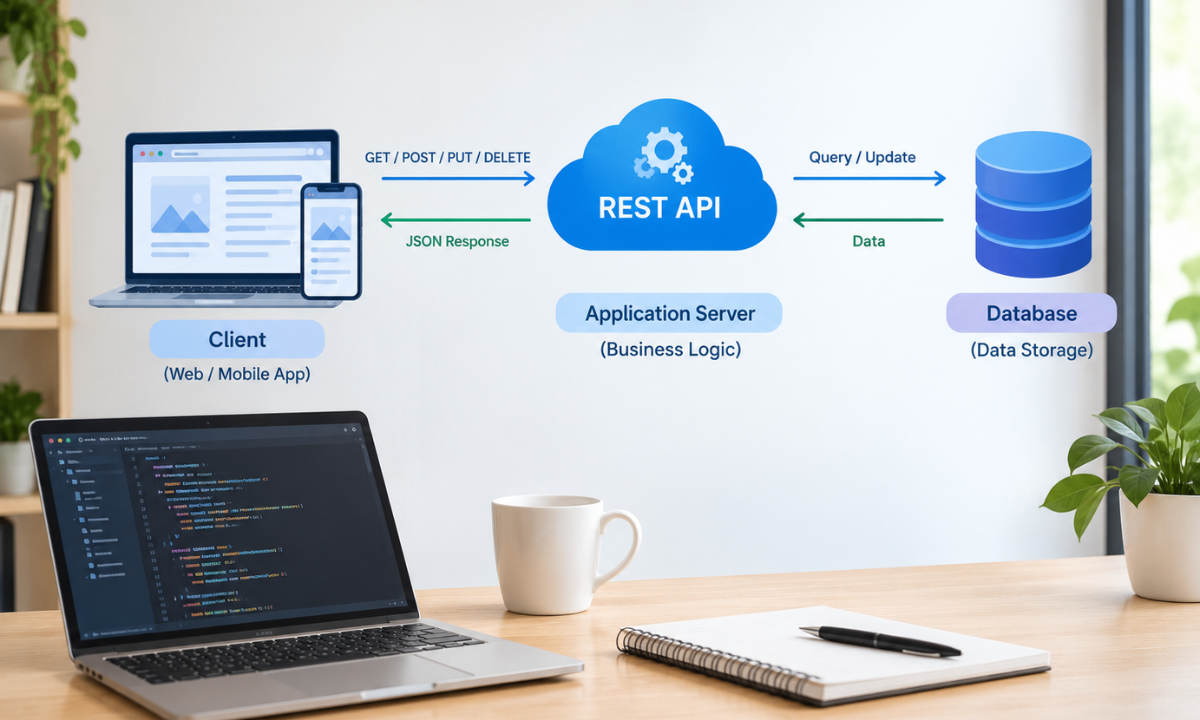
REST stands for Representational State Transfer. It is an architectural style used to design web services that communicate over HTTP. A RESTful API exposes resources through URLs and allows clients to interact with them using standard HTTP methods.
Consider an online shopping application. Its frontend may need to display products, create customer accounts, manage orders, and update shopping carts. The frontend sends API requests to the backend, which processes the requests, interacts with the database, and returns a response.
A typical full stack architecture includes:
-
Frontend: HTML, CSS, JavaScript, and frameworks such as React.
-
Backend: Node.js with Express, ASP.NET Core, or another server-side framework.
-
Database: MySQL, PostgreSQL, or MongoDB.
-
REST API: Connects frontend requests with backend operations and data.
For example, when a user opens a product page, the frontend sends a GET request to the backend. The API retrieves the requested product and returns its details, usually in JSON format.
Understanding this interaction helps developers build applications with clearly separated responsibilities. It also provides a foundation for learning frontend-backend integration through a structured full stack development syllabus.
2. Design Clear and Consistent API Endpoints
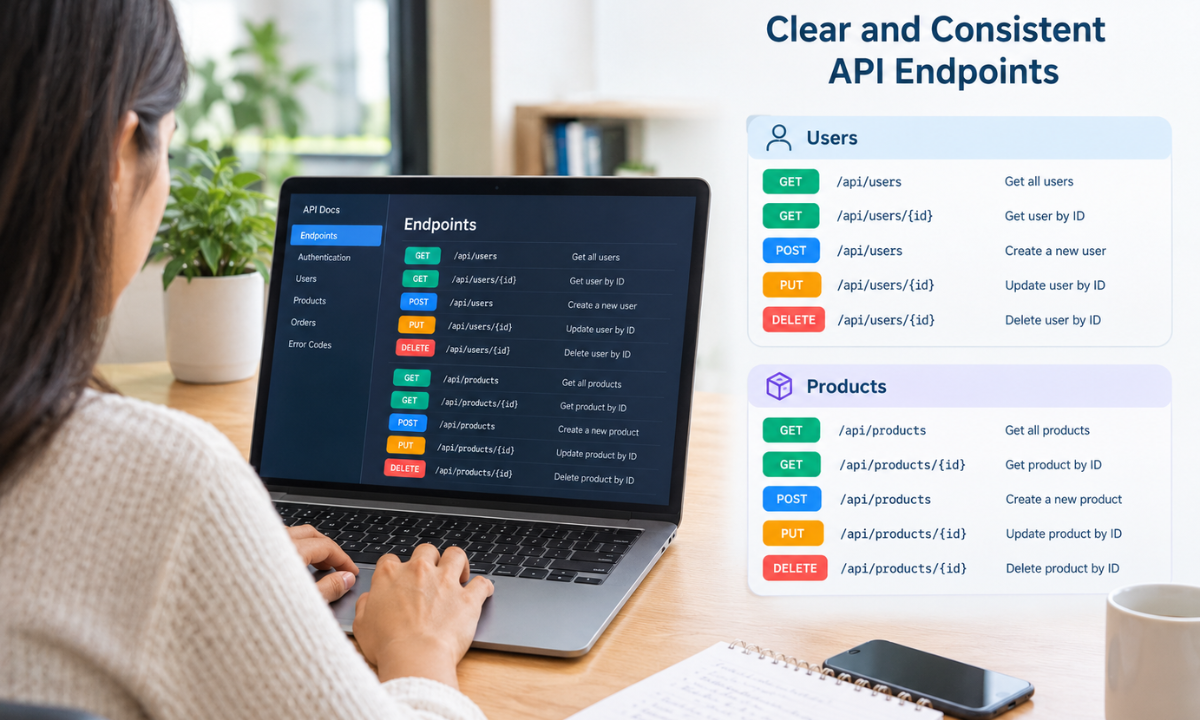
An API endpoint identifies a resource or collection of resources. Good endpoint design makes an API easier to understand, test, and maintain.
Use nouns to represent resources instead of describing actions in the URL. Keep naming consistent across the application.
For example, an online store might use the following endpoints:
|
Endpoint |
Purpose |
|
/api/products |
Retrieve or create products |
|
/api/products/101 |
Access a specific product |
|
/api/users |
Access the user collection |
|
/api/orders |
Retrieve or create orders |
|
/api/orders/501 |
Access a specific order |
Avoid endpoints such as /getProducts, /createNewOrder, or /deleteUser/10. These names mix actions with resource identifiers. HTTP methods should communicate the intended operation.
Use plural nouns consistently, keep URLs predictable, and avoid unnecessary nesting. For example, /api/orders/501/items is useful when accessing items belonging to a particular order.
For larger applications, versioning can help manage changes without disrupting existing clients. A common approach is /api/v1/products. When a future version introduces breaking changes, /api/v2/products can provide a separate contract.
3. Use HTTP Methods Correctly
HTTP methods define what the client wants to do with a resource. Choosing the correct method makes API behaviour predictable and supports reliable frontend-backend integration.
|
HTTP method |
Purpose |
Example |
|
GET |
Retrieve data |
GET /api/products |
|
POST |
Create a resource |
POST /api/products |
|
PUT |
Replace a resource |
PUT /api/products/101 |
|
PATCH |
Update selected fields |
PATCH /api/products/101 |
|
DELETE |
Remove a resource |
DELETE /api/products/101 |
For example, a POST request can create a new product by sending its name, price, and description in the request body. A PATCH request can update only its price without changing the other fields.
GET requests should not modify server data. PUT and DELETE are generally idempotent, meaning repeating the same request should produce the same intended final state. POST is not necessarily idempotent, so developers should consider duplicate submissions when processing payments or creating orders.
Using HTTP methods consistently reduces confusion and makes API testing easier.
4. Validate Incoming Data
Data validation prevents invalid or incomplete information from reaching application logic or the database. Client-side validation improves user experience, but it should never replace server-side validation because API requests can be sent directly without using the frontend.
For example, when creating a user account, the backend should validate:
-
Required fields, such as name and email address.
-
Correct formats for email addresses and phone numbers.
-
Password length and complexity requirements.
-
Data types, such as numbers for product prices.
-
Business rules, such as preventing negative prices.
-
Maximum field lengths and allowed values.
Consider an API that accepts a product price. The backend should reject a request containing a negative number or an invalid string instead of saving incorrect data.
Validation should also distinguish between invalid input and unauthorized actions. A user may submit valid data but still lack permission to update a particular resource.
Use a consistent validation library or framework where appropriate. Return clear messages that identify the invalid fields without exposing internal implementation details.
5. Implement Authentication and Authorization
Security is a core part of REST API design. Authentication verifies who is making a request, while authorization determines what that user can access or modify.
Common authentication approaches include session-based authentication, JSON Web Tokens (JWT), and OAuth 2.0 or OpenID Connect, depending on the application's requirements.
For example, an e-commerce application may allow customers to view products publicly but require authentication to access order history. Even after login, a customer should not be able to retrieve another customer's private orders.
Follow these practices:
-
Use HTTPS to protect data transmitted between clients and servers.
-
Validate tokens or sessions on protected endpoints.
-
Apply role-based or resource-level access controls where needed.
-
Store passwords using a suitable password-hashing algorithm.
-
Never expose API keys, passwords, or access tokens in public code.
-
Apply rate limiting to reduce abuse and brute-force attempts.
Authorization checks must happen on the server. Hiding a button in the frontend does not prevent someone from sending the same request directly to the API.
6. Return Appropriate HTTP Status Codes
HTTP status codes tell the client whether a request succeeded or why it failed. Using them consistently helps frontend developers handle responses correctly.
|
Status code |
Meaning |
Common use |
|
200 OK |
Request succeeded |
Retrieving or updating data |
|
201 Created |
Resource created |
Successful POST request |
|
204 No Content |
Request succeeded without a response body |
Successful deletion |
|
400 Bad Request |
Invalid request |
Malformed input |
|
401 Unauthorized |
Authentication is missing or invalid |
Invalid access token |
|
403 Forbidden |
Access is not permitted |
Insufficient permissions |
|
404 Not Found |
Resource not found |
Invalid product ID |
|
409 Conflict |
Request conflicts with current state |
Duplicate unique value |
|
422 Unprocessable Content |
Request content fails validation |
Invalid field values |
|
500 Internal Server Error |
Unexpected server failure |
Unhandled backend exception |
Choose codes according to the actual outcome. For example, a successfully created order should normally return 201 Created, while an invalid product ID may return 404 Not Found.
Do not return 200 OK for every request, including failures. Accurate status codes help frontend applications display useful messages and support automated API testing.
7. Handle Errors Consistently
Error handling should follow a predictable format across all endpoints. If every endpoint returns a different error structure, frontend developers must write additional logic to interpret each response.
A consistent JSON error response might look like this:
{
"status": 400,
"error": "Validation Error",
"message": "The product price must be greater than zero.",
"field": "price"
}
The frontend can use this information to display a message near the relevant form field.
Good error-handling practices include:
-
Use a central error-handling mechanism in the backend.
-
Return clear, actionable messages for expected errors.
-
Log technical details securely for debugging.
-
Avoid exposing database queries, stack traces, or secrets.
-
Handle network failures and timeouts on the frontend.
-
Use a request or correlation ID to trace errors across services when appropriate.
Developers should also test how the API responds when a database is unavailable, a request times out, or an unexpected exception occurs. Error handling is not complete until these scenarios have been considered.
8. Test and Document the API
API testing verifies that endpoints behave as expected under different conditions. Tools such as Postman can send HTTP requests, inspect response bodies, verify status codes, and test authentication.
For each endpoint, test successful requests, invalid inputs, missing authentication, insufficient permissions, nonexistent resources, and unexpected server errors.
Automated tests can check response structure, validation rules, and business logic whenever code changes. Integration tests are especially useful for checking how the API interacts with databases and other services.
Apponix also discusses the importance of practical development skills in its full-stack course syllabus guide, which covers backend development, API testing, Git, and deployment.
API documentation is equally important. OpenAPI is a widely used specification for describing endpoints, request parameters, authentication, response formats, and error codes. Clear documentation helps frontend developers integrate with the backend without repeatedly referring to its implementation.
Conclusion
Designing REST APIs requires more than creating URLs and connecting a database. Developers must choose meaningful endpoints, apply HTTP methods correctly, validate incoming data, secure protected resources, and return consistent status codes and error responses.
Testing and documentation help maintain API reliability as an application grows. These practices are useful for projects built with React, Node.js, Express, ASP.NET Core, and other modern web technologies.
Developers who want to strengthen these practical skills can explore our Full Stack Developer Course in Bangalore to understand how frontend development, backend programming, database management, API integration, and deployment work together in a complete web application.
Reference:
1)https://medium.com/@mdburkee/creating-restful-apis-a-full-stack-approach-e2150d182ee0
2)https://stackoverflow.blog/2020/03/02/best-practices-for-rest-api-design/

Apponix Academy
Apponix Academy