POPULAR COURSES
Master Programs





Table of contents:
|
1. Understand the Machine Learning Pipeline |
|
2. Prepare the Dataset |
|
3. Apply Data Preprocessing |
|
4. Perform Feature Engineering |
|
5. Build a Complete Scikit-learn Pipeline |
|
6. Evaluate the Trained Model |
|
7. Improve Model Reliability with Cross-Validation |
|
8. Prepare the Pipeline for Deployment |
|
9. Conclusion |
Machine learning projects involve more than selecting an algorithm and training a model. A reliable solution needs clean data, suitable features, proper evaluation, and a repeatable workflow. Without a structured process, data leakage, inconsistent preprocessing, and incorrect evaluation can affect model performance. That is why Apponix Academy, a No. 1 Training Institute in Bangalore, Pune, teaches learners to build complete machine learning workflows instead of isolated models.
Scikit-learn provides tools to manage these tasks in a single workflow. Its preprocessing methods, feature selection techniques, model training tools, and pipeline utilities help developers build machine learning solutions that are easier to test and maintain. If you want to see where it fits among the other tools data professionals use, read this Apponix guide to the Python libraries for data science.
This guide explains how to build an end-to-end machine learning pipeline using Scikit-learn, from preparing raw data to evaluating a trained model.
1. Understand the Machine Learning Pipeline
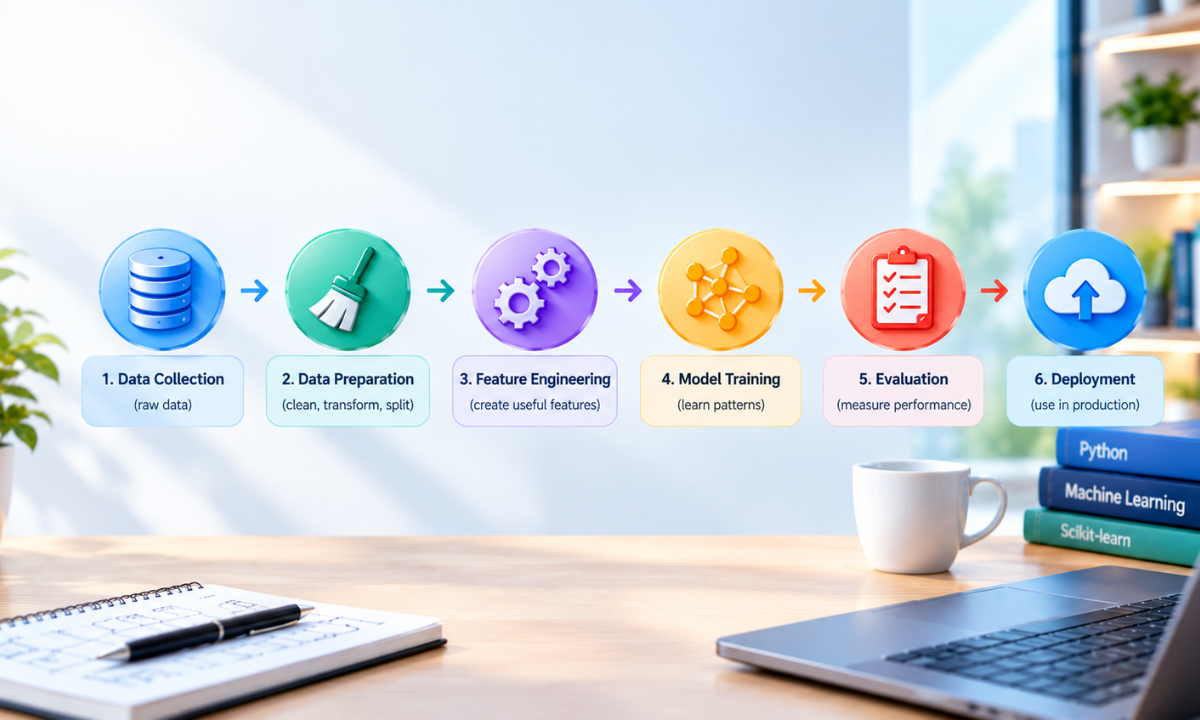
A machine learning pipeline connects the main stages of model development. Instead of handling each operation separately, you organise them into a consistent sequence.
A typical workflow includes:
-
Data collection: Gather relevant information from databases, files, or APIs.
-
Data preprocessing: Handle missing values, duplicate records, and inconsistent formats.
-
Feature engineering: Convert raw data into useful model inputs.
-
Model training: Fit a suitable machine learning algorithm to the training data.
-
Model evaluation: Measure performance using appropriate metrics.
-
Model deployment: Prepare the trained model for predictions on new data.
Each stage affects the quality of the final result. Understanding how these stages connect is an important part of practical machine learning and applied data science.
2. Prepare the Dataset
Start by importing the required libraries and loading a dataset. For this example, use the built-in breast cancer dataset available in Scikit-learn. It is suitable for demonstrating a classification workflow without requiring an external data source.
import pandas as pdfrom sklearn.datasets import load_breast_cancerfrom sklearn.model_selection import train_test_splitdata = load_breast_cancer(as_frame=True)X = data.datay = data.targetX_train, X_test, y_train, y_test = train_test_split( X, y, test_size=0.2, random_state=42, stratify=y)
Here, X contains the input features, while y contains the target labels. The dataset is divided into training and testing sets. The model learns patterns from the training data, while the test data provides an independent assessment of its performance.
The stratify=y parameter helps preserve the class distribution in both sets. The random_state parameter makes the split reproducible.
Keep the test set separate during model development. Using it repeatedly to make modelling decisions can lead to an overly optimistic estimate of performance.
3. Apply Data Preprocessing
Real-world datasets often contain missing values, different data types, and numerical features with different scales. Preprocessing addresses these issues before model training.
For numerical data, common techniques include median imputation for missing values and standardisation for features with different scales. Standardisation transforms values based on their mean and standard deviation.
Scikit-learn provides SimpleImputer and StandardScaler for these tasks.
from sklearn.impute import SimpleImputerfrom sklearn.preprocessing import StandardScalerfrom sklearn.pipeline import Pipelinepreprocessor = Pipeline([ ("imputer", SimpleImputer(strategy="median")), ("scaler", StandardScaler())])
The imputer replaces missing values with the median calculated from the training data. The scaler then standardises the features.
These transformations must be fitted on training data rather than the complete dataset. Otherwise, information from the test set could influence the training process. This problem is known as data leakage.
For datasets containing categorical features, use suitable techniques such as OneHotEncoder. A ColumnTransformer can apply different preprocessing steps to numerical and categorical columns within the same workflow.
4. Perform Feature Engineering
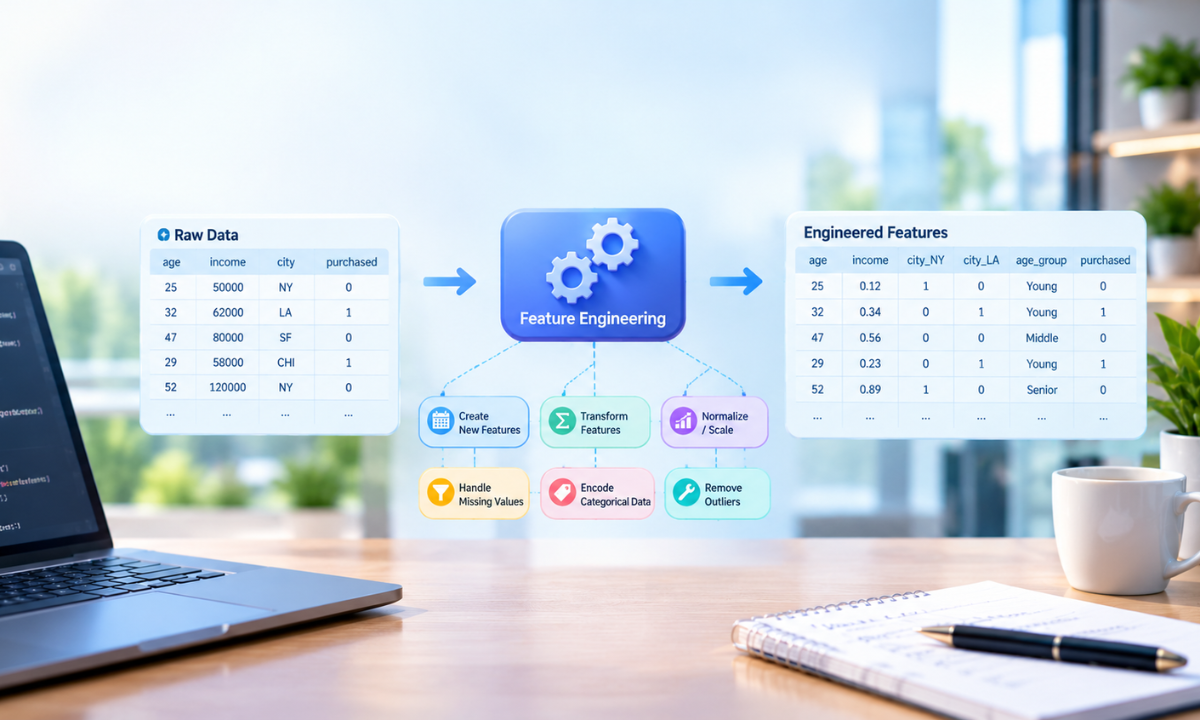
Feature engineering involves creating, transforming, or selecting input variables to improve a machine learning model. Useful features can help an algorithm identify patterns that are difficult to detect in raw data.
Common feature engineering techniques include:
-
Feature scaling: Bring numerical variables to a comparable scale.
-
Categorical encoding: Convert categories into numerical representations.
-
Feature selection: Remove irrelevant or redundant variables.
-
Feature transformation: Apply mathematical transformations to improve how data is represented.
-
Dimensionality reduction: Reduce the number of input variables while retaining useful information.
For example, a customer analytics project could create a new feature representing average monthly spending from transaction records. In a classification task, selecting relevant features can also reduce unnecessary complexity.
Read more about the importance of data cleaning and preprocessing to understand how data quality affects downstream analysis and model development.
Feature engineering should be based on the problem and available data. Not every dataset needs every technique.
5. Build a Complete Scikit-learn Pipeline
Scikit-learn's Pipeline combines preprocessing and model training into a single estimator. This helps ensure that the same transformations are applied consistently during training and prediction.
In this example, logistic regression is used to classify the observations.
from sklearn.linear_model import LogisticRegressionfrom sklearn.pipeline import Pipelinefrom sklearn.impute import SimpleImputerfrom sklearn.preprocessing import StandardScalermodel_pipeline = Pipeline([ ("imputer", SimpleImputer(strategy="median")), ("scaler", StandardScaler()), ("classifier", LogisticRegression(max_iter=1000))])model_pipeline.fit(X_train, y_train)
The pipeline first fills missing values, then standardises the features, and finally trains the classifier. Calling fit() runs these operations in the correct order.
This approach offers several benefits:
-
It reduces the risk of inconsistent preprocessing.
-
It helps prevent data leakage during cross-validation.
-
It makes the workflow easier to maintain.
-
It simplifies predictions on unseen data.
-
It supports reproducible machine learning experiments.
For datasets with both numerical and categorical columns, combine ColumnTransformer with Pipeline to manage different preprocessing methods in one estimator.
6. Evaluate the Trained Model
A model that performs well on training data may not generalise to unseen examples. Evaluation helps determine whether the model has learned useful patterns rather than simply memorising the training data.
Use the held-out test set to measure performance.
from sklearn.metrics import ( accuracy_score, classification_report, confusion_matrix)y_pred = model_pipeline.predict(X_test)print("Accuracy:", accuracy_score(y_test, y_pred))print(confusion_matrix(y_test, y_pred))print(classification_report(y_test, y_pred))
These metrics provide different views of model performance.
-
Accuracy: The proportion of predictions that are correct.
-
Precision: The proportion of positive predictions that are correct.
-
Recall: The proportion of actual positive cases identified by the model.
-
F1-score: The harmonic mean of precision and recall.
-
Confusion matrix: A breakdown of correct and incorrect predictions by class.
The most useful metric depends on the application. For example, a medical screening model may need strong recall because missing a positive case can have serious consequences. Accuracy alone may hide this weakness.
For a deeper understanding of how to prepare reliable datasets, explore what data preprocessing involves and its key techniques.
7. Improve Model Reliability with Cross-Validation
A single train-test split can produce results that depend on which observations fall into each set. Cross-validation provides a more robust way to assess model performance.
In k-fold cross-validation, the training data is divided into several folds. The model trains on most folds and validates on the remaining fold. This process repeats until each fold has served as the validation set.
Scikit-learn's cross_val_score makes this process straightforward.
from sklearn.model_selection import cross_val_score, StratifiedKFoldcv = StratifiedKFold( n_splits=5, shuffle=True, random_state=42)scores = cross_val_score( model_pipeline, X_train, y_train, cv=cv, scoring="accuracy")print("Fold scores:", scores)print("Mean accuracy:", scores.mean())
Passing the complete pipeline to cross-validation is important. Each fold fits its own preprocessing steps using only that fold's training portion. This reduces leakage during validation.
If the model requires tuning, use tools such as GridSearchCV or RandomizedSearchCV to compare hyperparameter settings. Keep the test set reserved for the final evaluation.
8. Save the Model for Reproducible Predictions
Once the model has been evaluated and finalised, save the entire pipeline. Saving only the classifier can cause problems because future data must undergo the same preprocessing steps used during training.
Python's joblib library can store the fitted pipeline.
import joblibjoblib.dump(model_pipeline, "ml_pipeline.joblib")# Load the saved pipelineloaded_pipeline = joblib.load("ml_pipeline.joblib")# Predict using new observationspredictions = loaded_pipeline.predict(X_test.iloc[:5])print(predictions)
The saved object includes the fitted imputer, scaler, and classifier. Loading the pipeline allows you to make predictions without rebuilding each transformation manually.
For reproducibility, record the dataset version, feature definitions, model parameters, random seeds, and library versions. These details help other developers understand how the model was created and reproduce the results.
Only load model files from trusted sources, as deserialising untrusted files can execute malicious code.
9. Prepare the Pipeline for Deployment
Model development does not end with saving a file. Before deployment, verify that the pipeline handles new data correctly and meets the application's requirements.
Important production checks include:
-
Validate input columns, data types, and expected formats.
-
Test the pipeline with unseen examples and edge cases.
-
Monitor prediction quality and changes in incoming data.
-
Track model versions and maintain a rollback option.
-
Measure inference time and resource requirements.
-
Retrain the model when new data or changing patterns justify it.
A pipeline can be integrated into an application using an API framework such as Flask or FastAPI. The application sends new observations to the loaded pipeline and returns its predictions.
Deployment also requires suitable monitoring. Changes in data distribution, known as data drift, can reduce model performance over time. Regular evaluation helps identify when investigation or retraining is needed.
Conclusion
Building an end-to-end machine learning pipeline with Scikit-learn creates a structured process for data preparation, feature engineering, model training, and evaluation. Using Pipeline ensures that preprocessing and prediction follow the same sequence, while cross-validation helps assess model reliability.
Reproducibility also depends on sound data handling, controlled experiments, version tracking, and careful deployment practices. These principles apply to classification, regression, and many other machine learning tasks.
For those exploring practical machine learning, a Data Science Course in Bangalore can provide a structured way to develop skills in Python, data preprocessing, statistical analysis, and model development through hands-on exercises and projects.
Reference:
1)https://medium.com/@connect.hashblock/my-end-to-end-ml-pipeline-using-scikit-learn-pandas-and-mlflow-41bdfa7e8e96
2)https://medium.com/@richardkameri327/how-to-build-a-an-end-to-end-machine-learning-pipeline-4e6de0913905

Apponix Academy
Apponix Academy