POPULAR COURSES
Master Programs





Table of contents:
|
1. What Is Dependency Injection in ASP.NET Core? |
|
2. How Dependency Injection Works in ASP.NET Core |
|
3. Understanding Service Lifetimes in ASP.NET Core
|
|
4. Transient vs Scoped vs Singleton: Key Differences |
|
5. Practical Example: Registering Multiple Services |
|
6. Common Dependency Injection Mistakes in ASP.NET Core |
| 7. Best Practices for Dependency Injection |
| 8. Conclusion |
Dependency Injection (DI) is a core feature of ASP.NET Core that helps developers build applications with clean, maintainable, and testable code. It allows a class to receive the services it needs instead of creating those services directly. This reduces tight coupling and makes it easier to update or test individual components.
Understanding dependency injection in ASP.NET Core is important when working with controllers, business services, database access, and application configuration. However, choosing the wrong service lifetime can lead to unexpected behaviour, memory usage issues, and errors during application execution.
This guide from Apponix Academy explains how dependency injection works, the differences between transient, scoped, and singleton services, practical C# examples, and common mistakes to avoid.
What Is Dependency Injection in ASP.NET Core?
Dependency Injection is a design pattern in which a class receives its dependencies from an external source. These dependencies are usually provided through a constructor.
For example, an order controller may need an order service to process customer requests. Instead of creating the service with the new keyword, the controller receives it through constructor injection.
public class OrderController : Controller
{
private readonly IOrderService _orderService;
public OrderController(IOrderService orderService)
{
_orderService = orderService;
}
public IActionResult Index()
{
return View();
}
}
Here, IOrderService represents the required dependency. ASP.NET Core's built-in dependency injection container provides an implementation when it creates the controller.
This approach separates the controller from the service implementation. It also makes unit testing easier because a test can supply a mock implementation of IOrderService.
To understand how controllers handle incoming requests, see the related guide on ASP.NET Core MVC and Web API architecture.
How Dependency Injection Works in ASP.NET Core
ASP.NET Core includes a built-in IoC (Inversion of Control) container. It manages service registration, object creation, dependency resolution, and service disposal when applicable.
Dependency injection generally involves three steps:
-
Define a service contract: Create an interface that describes the operations a service provides.
-
Register the service: Configure the interface and implementation in the application's service container.
-
Inject the dependency: Request the service through a constructor or another supported injection mechanism.
For example, the following code registers an order service:
builder.Services.AddScoped<IOrderService, OrderService>();
This registration tells ASP.NET Core to use OrderService whenever a component requests IOrderService within the relevant scope.
The AddScoped method is one of three commonly used service registration methods. The other two are AddTransient and AddSingleton. Each controls how long a service instance is reused.
Understanding Service Lifetimes in ASP.NET Core
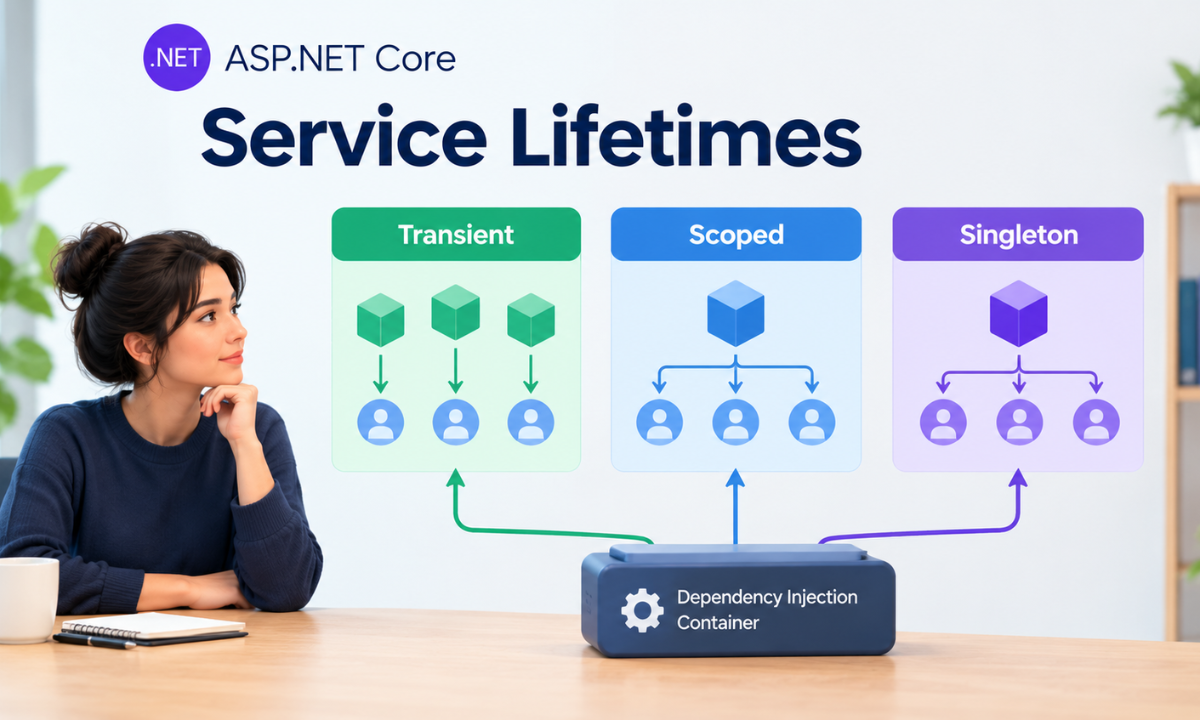
Service lifetimes determine when the dependency injection container creates a service instance and how long that instance is reused. Choosing the right lifetime helps prevent unnecessary object creation and resource management problems.
1. Transient Services
Transient services create a new instance every time the container resolves the service. They are suitable for lightweight, stateless operations that do not need to preserve information between calls.
Register a transient service using AddTransient:
builder.Services.AddTransient<IEmailFormatter, EmailFormatter>();
Whenever the container resolves IEmailFormatter, it creates a new EmailFormatter instance.
When to use transient services:
-
Formatting email messages or text.
-
Performing small calculations.
-
Applying simple data transformations.
-
Running operations that do not maintain shared state.
Transient services are useful when each operation should have an independent instance. However, creating many expensive transient objects can increase resource usage.
2. Scoped Services
Scoped services are created once per dependency injection scope. In a typical ASP.NET Core web application, a new scope is created for each HTTP request. Services registered as scoped are reused within that request but receive new instances in other requests.
Register a scoped service as follows:
builder.Services.AddScoped<IOrderService, OrderService>();
If a controller and another service request IOrderService within the same request scope, they receive the same instance.
When to use scoped services:
-
Business logic that handles a single request.
-
Database operations using Entity Framework Core.
-
Services that coordinate work during one request.
-
Operations that require request-specific state.
For example, Entity Framework Core's DbContext is commonly registered with a scoped lifetime through AddDbContext. This helps keep database operations within the intended request scope.
For example, Entity Framework Core’s DbContext is commonly registered with a scoped lifetime through AddDbContext. This helps keep database operations within the intended request scope.
Scoped services are often the default choice for request-oriented business logic in full-stack development, provided the service’s dependencies and state are appropriate for that lifetime.
3. Singleton Services
Singleton services are created once per service provider and reused for subsequent resolutions. In a typical application, this means the same instance is shared across HTTP requests.
Register a singleton service using AddSingleton:
builder.Services.AddSingleton<IAppSettings, AppSettings>();
The container reuses the registered instance throughout the service provider's lifetime.
When to use singleton services:
-
Thread-safe application-wide caches.
-
Immutable configuration-related helper services.
-
Shared services that maintain no request-specific state.
-
Expensive objects that are safe to reuse.
Singleton services must be designed carefully, as this is part of the basics of full stack developer work. If multiple requests access the same instance simultaneously, shared mutable data can cause race conditions. Singleton services should also avoid holding request-specific information.
Transient vs Scoped vs Singleton: Key Differences
|
Feature |
Transient |
Scoped |
Singleton |
|
Instance creation |
Each resolution |
Once per scope |
Once per service provider |
|
Typical web behaviour |
New instance when resolved |
Reused within a request |
Reused across requests |
|
Common use case |
Lightweight operations |
Business and database services |
Thread-safe shared services |
|
Shared state |
Not shared through separate resolutions |
Shared within the same scope |
Shared across scopes |
|
Main concern |
Excessive object creation |
Incorrect use outside its scope |
Thread safety and long-lived state |
The correct lifetime depends on how the service manages state, uses resources, and interacts with other dependencies. A service should not be registered as a singleton simply to reduce object creation.
Practical Example: Registering Multiple Services
Consider an ASP.NET Core application that uses three services for formatting messages, processing orders, and storing shared application information.
builder.Services.AddTransient<IMessageFormatter, MessageFormatter>();
builder.Services.AddScoped<IOrderService, OrderService>();
builder.Services.AddSingleton<IAppCache, AppCache>();
Each registration has a different purpose:
-
MessageFormatter creates a new instance whenever the container resolves it.
-
OrderService is reused within the current request scope.
-
AppCache is shared across requests through the same service provider.
A controller can request these services through constructor injection:
public class OrdersController : Controller
{
private readonly IMessageFormatter _formatter;
private readonly IOrderService _orderService;
private readonly IAppCache _cache;
public OrdersController(
IMessageFormatter formatter,
IOrderService orderService,
IAppCache cache)
{
_formatter = formatter;
_orderService = orderService;
_cache = cache;
}
}
This keeps service creation separate from controller logic. The dependency injection container resolves the registered dependencies automatically, provided their own dependencies can also be resolved.
The example illustrates registration and injection. In a complete application, each interface and implementation must be defined, and the cache implementation must be safe for concurrent access.
Common Dependency Injection Mistakes in ASP.NET Core
Even though dependency injection simplifies application development, incorrect service registration can cause runtime errors and difficult-to-diagnose bugs.
1. Injecting a Scoped Service into a Singleton
A singleton lives longer than a scoped service. Injecting a scoped dependency directly into a singleton can cause that dependency to behave as if it has a much longer lifetime than intended.
For example, a singleton that directly depends on a scoped database service may retain request-related state beyond its intended scope.
How to avoid it: Keep the dependency lifetimes compatible. If a singleton must perform scoped work, use IServiceScopeFactory to create and dispose of a scope when needed.
2. Using a Singleton for Mutable, Shared State
A singleton instance may be accessed by several requests at the same time. If it modifies shared data without proper synchronisation, race conditions and inconsistent results can occur.
How to avoid it: Prefer immutable data where possible. For shared mutable state, use appropriate thread-safe data structures or synchronisation mechanisms.
3. Creating Services Manually
Creating dependencies with new inside controllers or other services bypasses the dependency injection container for those objects. This can make testing harder and prevent the container from managing their dependencies and disposal.
How to avoid it: Register application services with the container and inject them through constructors when appropriate.
4. Registering Every Service as Transient
Transient registration may appear convenient, but it can create unnecessary instances when services are expensive to construct or depend on other resources.
How to avoid it: Choose the lifetime based on the service's responsibilities, state, and dependencies rather than applying one lifetime everywhere.
5. Using Scoped Services Outside an HTTP Request
A scoped service may be unavailable or incorrectly managed when used by background tasks or singleton services without an explicit scope.
How to avoid it: Create a scope using IServiceScopeFactory for background operations and dispose of the scope when the work finishes.
6. Forgetting Service Registration
If an interface is not registered and no suitable registration exists, ASP.NET Core may throw an exception when it attempts to resolve the dependency.
How to avoid it: Check service registrations in Program.cs and verify that every required dependency has a resolvable implementation.
Best Practices for Dependency Injection
Follow these practices to keep an ASP.NET Core application maintainable:
-
Prefer constructor injection for required dependencies.
-
Use interfaces when they provide a useful abstraction or testing boundary.
-
Choose service lifetimes based on state, resource usage, and dependency requirements.
-
Avoid storing request-specific data in singleton services.
-
Keep constructors focused on declaring dependencies rather than performing complex work.
-
Let the dependency injection container manage service creation and disposal.
-
Test service registrations and important lifetime behaviours.
-
Enable scope validation in development to identify lifetime mismatches early.
These practices support a modular application structure and make it easier to maintain business logic as the application grows.
Conclusion
Dependency injection is an essential part of ASP.NET Core application development. It separates object creation from business logic, supports unit testing, and makes services easier to maintain.
Transient services are appropriate for lightweight operations that need independent instances. Scoped services work well for request-level business logic and database operations. Singleton services suit shared, thread-safe components that can safely live for the application's service provider lifetime.
Understanding these differences helps developers avoid common lifetime errors and build reliable .NET applications. For developers looking to strengthen their practical knowledge of C#, ASP.NET Core, database integration, and application architecture, structured learning through dot net training in Bangalore can provide a foundation for working with these concepts in real projects.
Reference:
1)https://medium.com/dot-net-sql-learning/dependency-injection-lifetimes-explained-with-real-examples-e6c6d9ca66d1
2)https://dev.to/outdated-dev/understanding-dependency-injection-lifetimes-singleton-scoped-and-transient-1ilb

Apponix Academy
Apponix Academy