POPULAR COURSES
Master Programs



Table of contents:
|
1. Why Practice with Real Code? |
|
2. Level 1: The Absolute Basics (Hello World & Variables) |
|
3. Level 2: Control Flow (If/Else Statements) |
|
4. Level 3: Loops and Iterations (For/While Loops) |
|
5. Level 4: Arrays and Data Handling |
|
6. Conclusion & Next Steps |
If you want to master programming, reading textbooks is simply not enough. You have to write code.
Whether you are self-taught or looking to enrol in a top-rated Java Course In Bangalore, the secret to success is hands-on practice.
The syntax and logic of a language only truly make sense when you start building actual applications and solving real problems on your screen.
This guide is designed to help you transition from theory to practical execution.
We have compiled a curated list of the best Java Language Program Examples to kickstart your coding journey.
From printing your first line of text to handling conditional logic and loops, every Java Language Program Example provided here will help you understand the core concepts of the language step by step.
Let's dive in and start coding.
Why Practice with Real Code?
When learning any new skill, passive consumption only takes you so far.
You can watch countless tutorials and read heavy textbooks, but the core logic of programming will remain abstract until you start typing.
Typing out Java programs for practice bridges the gap between theory and execution.
It forces you to deal with the realities of software development: missing semicolons, logical errors, and unexpected outputs.
Every time you encounter a bug and successfully fix it, you are building the problem-solving muscles required in the IT industry.
Engaging actively in Coding In Java Program environments trains your brain to think like a computer.
You learn how to break down a large problem into smaller, manageable steps.
Hands-on practice not only reinforces syntax but also builds the confidence you need to tackle more complex projects, build a strong portfolio, and ultimately succeed in technical interviews.
Level 1: The Absolute Basics (Hello World & Variables)
Before you can build complex software or web applications, you need to understand how Java talks to the computer.
This involves learning the basic syntax, creating a class, and using the main method to display an output on your screen.
Example 1: The Hello World Program
When you are looking for Simple Java programs for beginners, this is always the starting point. It shows you the absolute minimum code required to run a program.
JAVA CODE:
public class HelloWorld {
public static void main(String[] args) {
System.out.println("Hello, World!");
}
}
This short code block teaches you the mandatory structure of a Java file.
Every piece of code in Java must live inside a "class", and the program always starts executing from the "main" method.
The System.out.println command is what actually prints the text to your screen.
Example 2: Adding Two Numbers
Once you know how to print text, the next step is to store and manipulate data. We do this using variables.
JAVA CODE
public class AddNumbers {
public static void main(String[] args) {
int a = 10;
int b = 20;
int sum = a + b;
System.out.println("The sum is: " + sum);
}
}
This is a very practical Simple Program In Java to understand how computer memory works.
Variables are simply containers for storing data values. In this code, we use the int data type to store whole numbers.
Writing such Java Example Programs helps you get comfortable with basic arithmetic operations and shows you how to combine regular text with your calculated results.
Level 2: Control Flow (If/Else Statements)
Up until now, our code has executed in a straight line, from top to bottom.
But what if you want your program to make a decision? In the real world, you take different actions based on different conditions.
In programming, we do this using control flow statements like if and else.
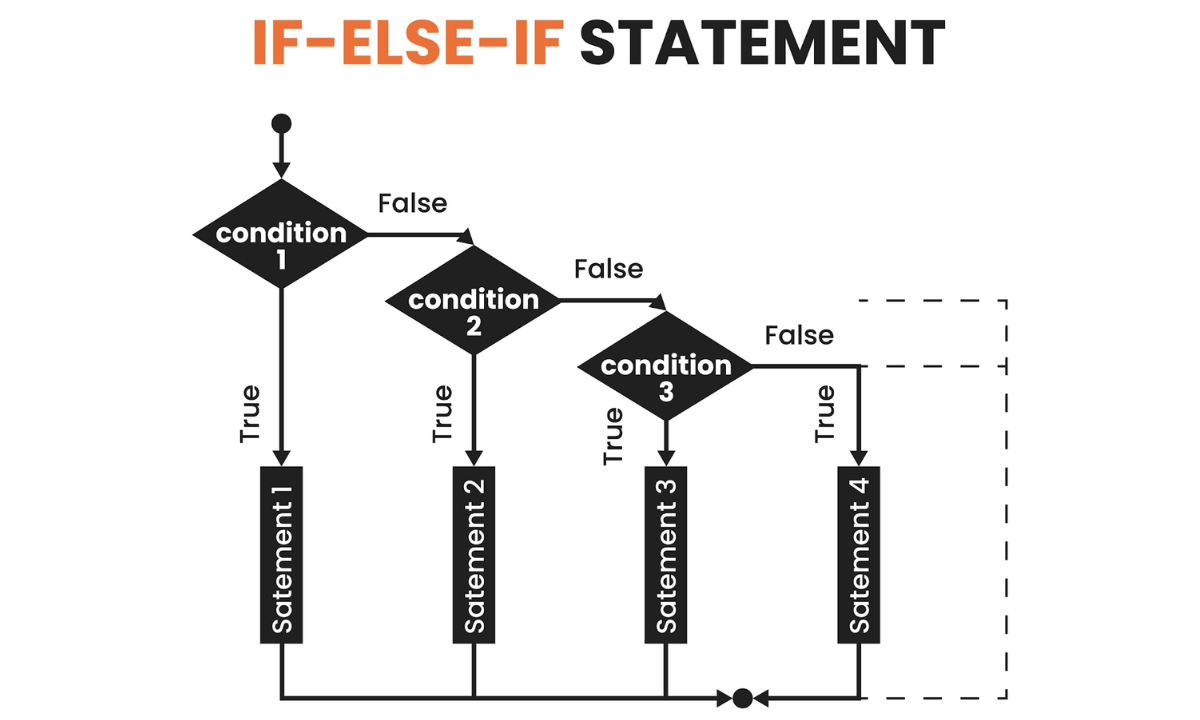
Understanding control flow is essential when looking at any Codes For Java Programming.
An if statement checks a specific condition (which must evaluate to true or false).
If the condition is true, the program runs a specific block of code.
If the condition is false, it skips that block and moves to the else block to run an alternative piece of code.
Example 3: Checking if a Number is Even or Odd
Let's look at a practical Example Of Java Program Code that uses conditional logic to determine if a given number is even or odd.
JAVA CODE
public class EvenOrOdd {
public static void main(String[] args) {
int number = 13;
// Checking the condition using the modulus operator
if (number % 2 == 0) {
System.out.println(number + " is an even number.");
} else {
System.out.println(number + " is an odd number.");
}
}
}
In this code, the modulus operator (%) divides the number by 2 and checks the remainder.
If the remainder is exactly 0, the condition is true, and the number is even.
Otherwise, the condition is false, and it is odd.
This is one of the most classic Java Simple Programs you will write, and it perfectly demonstrates how a computer makes binary decisions on its own.
Level 3: Loops and Iterations (For/While Loops)
As your applications grow, you will often find yourself needing to repeat the same action multiple times.
Writing the same lines of code over and over is inefficient and violates a core programming principle known as DRY (Don't Repeat Yourself).
This is where loops come into play.
Loops allow you to run a block of code continuously as long as a specific condition remains true.
The two most common types you will encounter are the for loop (best used when you know exactly how many times you want to iterate) and the while loop (best used when the number of iterations depends on a dynamic condition).
Example 4: Generating a Fibonacci Series
The Fibonacci sequence is a classic logic problem where every number is the sum of the two preceding ones (0, 1, 1, 2, 3, 5, 8...).
It is one of the most frequently requested Java Programming Code Examples in early technical interviews.
JAVA CODE
public class FibonacciExample {
public static void main(String[] args) {
int n = 10; // Number of terms to print
int firstTerm = 0, secondTerm = 1;
System.out.println("Fibonacci Series up to " + n + " terms:");
for (int i = 1; i <= n; i++) {
System.out.print(firstTerm + " ")
// Calculate the next number in the sequence
int nextTerm = firstTerm + secondTerm;
firstTerm = secondTerm;
secondTerm = nextTerm;
}
}
}
Looking at such Java Coding Samples is crucial for understanding how to manipulate variables within a repeating cycle.
In this for loop, we initialize an index i, check if i is less than or equal to n, and increment i after each cycle.
Learning how to properly Code In Java using loops gives you the power to process large datasets and complex algorithms efficiently.
Level 4: Arrays and Data Handling
As you progress in your coding journey, you will quickly realize that storing single pieces of data in individual variables becomes inefficient.
Imagine writing a program to manage the test scores of 100 students.
Creating 100 separate integer variables is simply not practical. This is where arrays come in.
An array is a special type of container object that holds a fixed number of values of a single data type.
You can think of an array as a neatly organized row of lockers, where each locker contains a value and is identified by a unique index number (which always starts at zero in Java).
Example 5: Finding the Largest Number in an Array
Let's look at one of the most common Java Program Questions you will encounter in beginner assessments: searching through a collection of data to find a specific value.
JAVA CODE
public class LargestInArray {
public static void main(String[] args) {
// Initialize an array of integers
int[] numbers = {25, 14, 56, 15, 36, 56, 77, 18, 29, 49};
// Assume the first element is the largest to start
int max = numbers[0];
// Loop through the array to compare the remaining elements
for (int i = 1; i < numbers.length; i++) {
if (numbers[i] > max) {
max = numbers[i]; // Update max if a larger number is found
}
}
System.out.println("The largest number in the array is: " + max);
}
}
This code snippet is the perfect way to make Java Programming Simple because it combines everything we have learned so far in the Java training: variables, control flow, and loops.
We start by declaring an array named 'numbers' and pre-filling it with values.
We initialize our max variable with the very first item in the array (numbers[0]). Then, using a for loop, we iterate through the rest of the array. During each cycle, the if statement checks whether the current number is greater than our stored max.
If it is, the max variable is updated. By the time the loop finishes, you have definitively found the largest number.
When you study different Java program examples, you will see arrays used everywhere, from sorting algorithms to building the backend logic of web applications.
Conclusion & Next Steps
Mastering a programming language is a journey that requires patience, logical thinking, and, above all, consistent hands-on practice.
The Java Language Program Examples we have explored, from basic console outputs to conditional logic, loops, and data arrays, form the foundational building blocks of software development.
Every complex application, whether it is an enterprise-level web backend or a simple mobile application, relies on these very same core principles.
However, practicing isolated snippets is just the beginning.
To truly grow as a developer and become industry-ready, you need to transition from writing standalone scripts to building comprehensive, real-world projects.
This means diving deeper into object-oriented programming (OOP), database connections, and advanced frameworks.
If you are ready to take your coding skills to the next level, structured learning is your best next step.
We encourage you to explore the comprehensive courses at Appoinx.
By enrolling, you will get expert guidance, hands-on experience with advanced projects, and the exact roadmap you need to accelerate your tech career.
Keep coding, keep experimenting, and watch your skills grow!

Apponix Academy
Apponix Academy