POPULAR COURSES
Master Programs
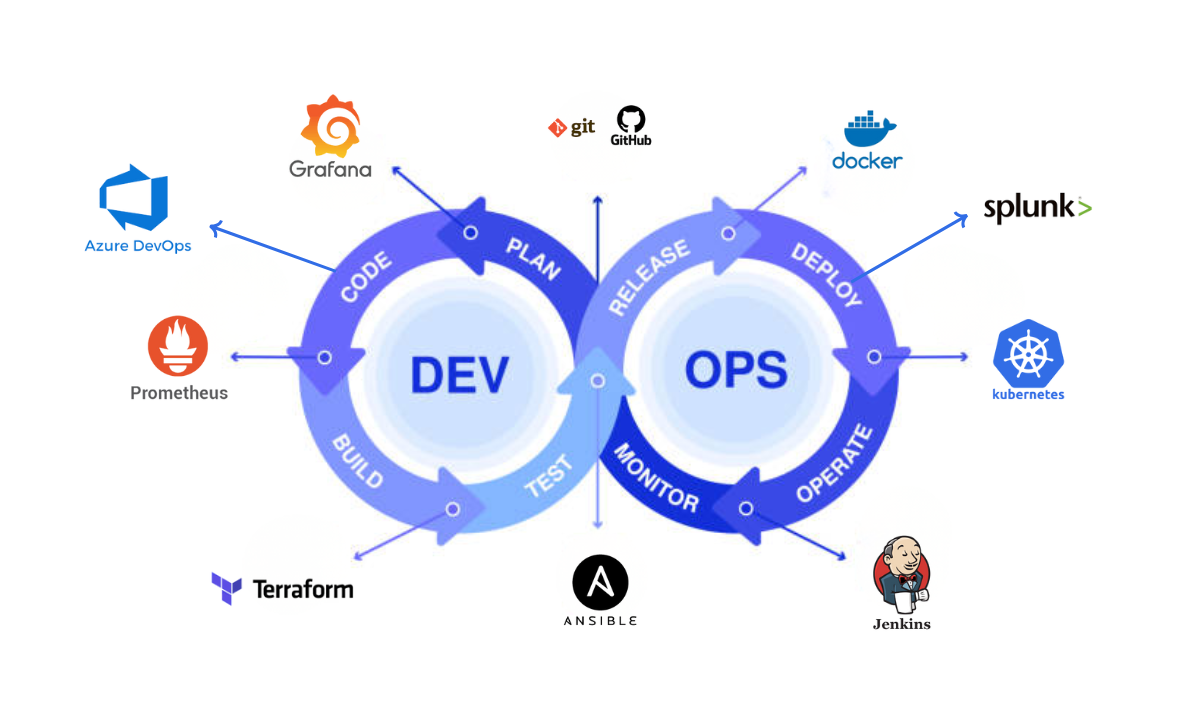
Table of contents:
| 1. Git and GitHub |
|
2. Docker |
|
3. Kubernetes |
|
4. Jenkins |
|
5. Ansible |
|
6. Terraform |
|
7. Prometheus |
|
8. Grafana |
|
9. Splunk |
|
10. Azure DevOps |
|
11. Wrapping Up |
|
12. FAQs |
As a trainer guiding aspiring IT professionals in Bangalore on the path to DevOps excellence, I often encounter one critical question: Which DevOps tools should you master to build a successful career?
In this blog, I’ll walk you through the top 10 DevOps tools that are most used in 2025 and beyond, tools you’ll frequently see in job descriptions, on real-world projects, and in our DevOps course in Bangalore. Let’s dive in.
1. Git and GitHub
One of the foundational “most used DevOps tools” you must know is version control, and in particular Git and GitHub. Whether you’re working solo or in a team, tracking code changes, branching, merging, and collaboration all revolve around Git.
GitHub builds on top of Git with repositories, pull requests, issues, and more. As I train students in our institution, the first week always covers Git flow, branching strategies, and how real teams use GitHub for DevOps workflows.
2. Docker
Once version control is under your belt, the next step is containerization. The tool that changed the way applications are packaged and deployed. Docker is the go-to container platform.
It allows you to build, ship, and run containers consistently across environments. In a DevOps pipeline, you’ll often use Docker images for your services, share them, deploy them, and ensure that what you develop locally runs identically in production.
3. Kubernetes
Moving up from containers, you need orchestration. Kubernetes is the industry-standard container orchestration tool: scheduling, scaling, rolling updates, self-healing – all made easier. In our training sessions, we teach Kubernetes architecture, pods, services, deployments, and how you integrate it with pipelines. Mastering Kubernetes gives you a significant edge in DevOps roles.
4. Jenkins
When we talk about CI/CD (continuous integration / continuous deployment) pipelines, the glue that connects your code, containers, infrastructure, and deployment. Jenkins is a veteran.
Many organisations still rely on Jenkins for automating the building, testing, and deployment of code. As a trainer, I stress that knowing Jenkins job configuration, pipeline as code (Jenkinsfile), and integrating Jenkins with Git, Docker, and Kubernetes is a core competency.
5. Ansible
Configuration management and automation of server setup is another key area of the DevOps tool chain. Ansible is one of the primary tools here. It allows you to define infrastructure states using playbooks, automate deployments, and manage configurations across many servers.
I always emphasise in our course how Ansible reduces manual work, ensures consistency, and improves the reliability of operations, critical aspects of a DevOps mindset.
6. Terraform
When your infrastructure becomes code, you need tools that help you define, provision, and manage infrastructure declaratively. Terraform is one of the top DevOps tools for Infrastructure as Code (IaC).
Whether you’re deploying to the cloud or on-prem, Terraform lets you version your infra, roll back, and treat infrastructure modifications like code changes. In our classroom, we cover Terraform modules, state management, and how it integrates with CI/CD pipelines.
7. Prometheus
Monitoring and observability are often overlooked in beginner discussions, but they’re essential in production. Prometheus is one of the prominent open-source monitoring systems in the DevOps toolkit.
It collects metrics, allows alerting, and works well in containerised environments like Kubernetes. I ensure my students get hands-on with Prometheus and understand how monitoring feeds back into reliable deployments and DevOps success.
8. Grafana
Complementing Prometheus is Grafana, the tool for visualising metrics, dashboards, and gaining insights. You’ll often see Prometheus metrics piped into Grafana so teams can monitor service health, track KPIs, and drill into issues.
In the DevOps course, I run dedicated sessions on building Grafana dashboards, using panels, alerting, and integrating with other logging/monitoring stacks.
9. Splunk
On the log-management and analysis front, Splunk remains a strong player in enterprise environments. As applications scale and logs proliferate, being able to collect, search, analyse, and visualise logs is a major challenge.
For students aiming at enterprise DevOps roles, knowledge of Splunk (or equivalent) adds value by combining monitoring metrics (Prometheus/Grafana) with logging insights (Splunk), giving you a full observability story.
10. Azure DevOps
Finally, as organisations shift to cloud-native and platform workflows, platforms like Azure DevOps simplify the end-to-end pipeline: version control, boards/project tracking, CI/CD pipelines, artefact management, and release orchestration.
For learners who want to target roles working with the Microsoft Azure ecosystem, mastering Azure DevOps offers a clear path. I make sure my cohort gets exposure to Azure DevOps services, pipeline creation, and integrations with other tools like GitHub, Terraform, and Kubernetes.
Wrapping Up
In summary, as a trainer at Apponix, I recommend that you don’t just pick one tool and stop there. A successful career in DevOps demands familiarity with a suite of tools, spanning version control (Git/GitHub), containerisation (Docker), orchestration (Kubernetes), automation/configuration (Jenkins, Ansible, Terraform), and observability (Prometheus, Grafana, Splunk), plus cloud pipeline platforms (Azure DevOps).
By mastering these top 10 DevOps tools, you position yourself strongly for the job market and for the real-world demands of DevOps roles. If you’re seeking structured guidance and hands-on practice, our DevOps course in Bangalore is designed exactly for that. We build your competence, confidence, and readiness.
FAQs
Q1: Do I need to learn all these tools to get a DevOps job?
You don’t need to be an expert in all of them to start, but you should be comfortable with several across different categories (version control, containers, orchestration, CI/CD, monitoring). Over time, you can deepen your knowledge.
Q2: Which tool should I start with if I’m new to DevOps?
Start with Git and GitHub for version control, then pick up Docker to understand containerisation. Once you’re comfortable, move to orchestration (Kubernetes) and CI/CD (Jenkins).
Q3: How does the DevOps training institute in Bangalore help with these tools?
We organise structured hands-on sessions for each tool, real-world projects to apply them in combination, and guidance on how to integrate them into cohesive pipelines so you can use them confidently in a job environment.
Q4: Do I need to learn cloud platforms separately?
Yes, cloud understanding helps (AWS, Azure, GCP) because many DevOps pipelines run in the cloud. For example, Azure DevOps is targeted specifically at the Azure ecosystem. But the tool skills above translate across cloud environments.
Q5: What’s the importance of monitoring/logging tools like Prometheus, Grafana, or Splunk?
Even the best deployment pipeline can fail if you don’t monitor service health, logs, or metrics. These observability tools ensure reliability, performance insight, and faster remediation — making you a more complete DevOps engineer.

Apponix Academy
Apponix Academy